

You probably didn’t wake up today excited about how to clean vacuum cleaner parts, but here you are, staring at that thing like it betrayed you—less suction, weird smell, maybe a noise that wasn’t there before, and yeah, it’s kinda gross if we’re being honest. It happens. You use it to clean mess, but no one really tells you how to clean the cleaner itself, which feels like a design flaw or maybe just life being slightly annoying again.
Let’s fix that, in a way that doesn’t feel like a science project or a punishment.
Why Cleaning Your Vacuum Cleaner Actually Matters (more than you think, annoyingly)
You might assume your vacuum just… handles dirt. Like that’s its whole personality. But nope, it clogs up, fills up, and slowly turns into a tired version of itself.
A dirty vacuum cleaner can:
- Lose suction power (you notice this first, always)
- Spread dust instead of removing it (kinda ironic, right)
- Start smelling weird (like burnt dust, not great)
- Wear out faster (and those things aren’t cheap)
According to data from appliance manufacturers, a poorly maintained vacuum can lose up to 50% of its efficiency over time. Which is basically like trying to mop your floor with a damp sock—technically doing something, but not really helping.
So yeah, learning how to clean vacuum cleaner components isn’t optional if you want it to last.
What You’ll Need Before You Start
You don’t need anything fancy, just some basic stuff lying around your home probably:
- A pair of scissors or seam ripper
- Microfiber cloth or an old t-shirt
- Warm water
- Mild dish soap
- A small brush (toothbrush works fine honestly)
- Screwdriver (sometimes)
- Patience, but like, a medium amount not extreme
You don’t need to go shopping for this. If you do, you’re overthinking it a bit.
Step-by-Step: How to Clean Vacuum Cleaner Properly
1. Unplug It First (seriously, don’t skip this)
Feels obvious, but people forget. You don’t want your vacuum suddenly deciding to wake up mid-cleaning like a haunted appliance.
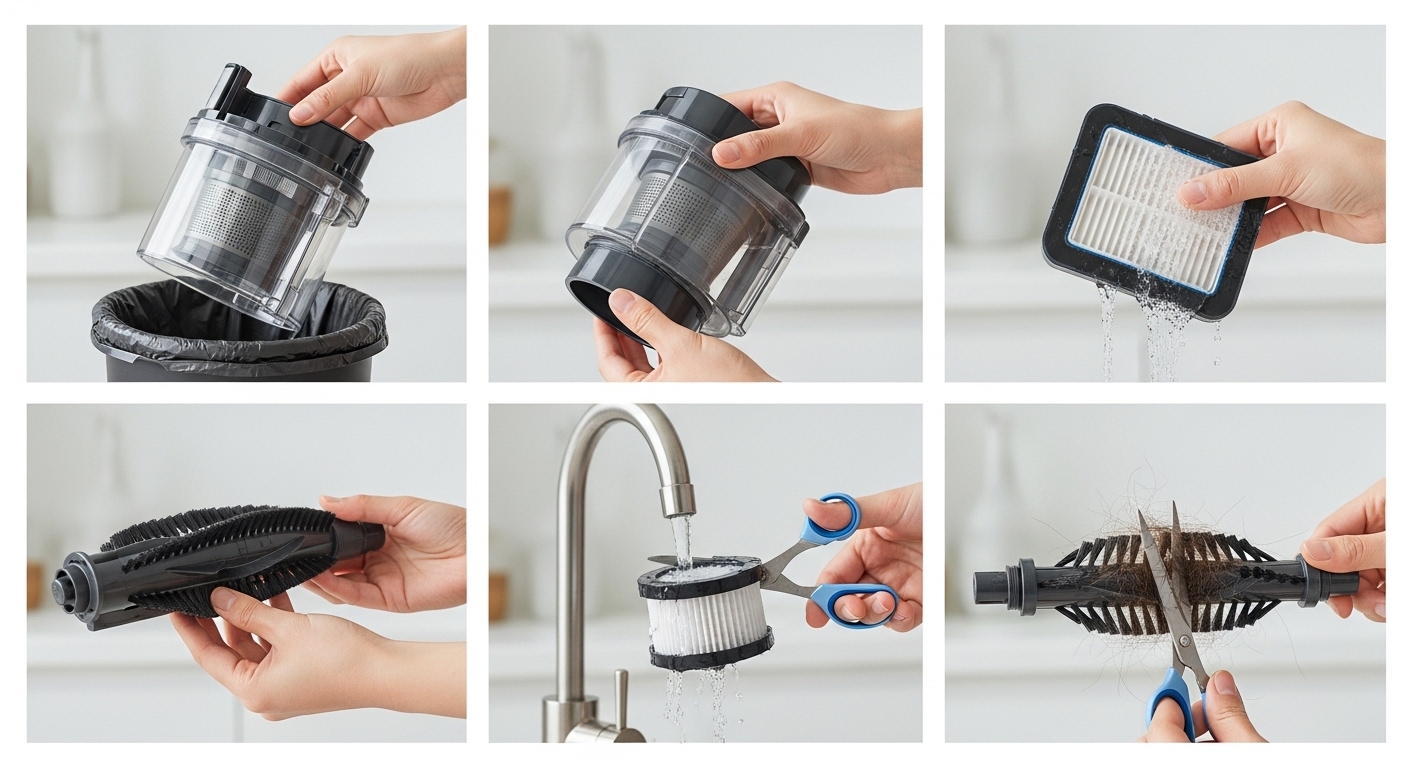
2. Empty the Dust Bin or Replace the Bag
If you’re using a bagless vacuum:
- Remove the dust container
- Dump contents into a trash bag (outside if possible, trust me on this)
- Tap it lightly to loosen stuck debris
If it’s a bagged vacuum:
- Replace the bag when it’s about 2/3 full (not when it’s bursting, that’s too late already)
A full bin reduces airflow, which is basically the whole point of a vacuum gone wrong.
3. Wash the Dust Container
This part feels oddly satisfying.
- Rinse with warm water
- Add a little dish soap
- Scrub gently with a brush
Then leave it to air dry completely. And I mean completely. Even a little moisture can turn into mold, which is a whole different mess you don’t want.
4. Clean or Replace Filters (this part gets ignored a lot)
Most vacuums have at least one filter, sometimes two:
- Pre-motor filter
- HEPA filter
Here’s a simple guide:
| Filter Type | Cleaning Method | Replacement Frequency |
|---|---|---|
| Foam filter | Wash with water | Every 3–6 months |
| HEPA filter | Tap gently or replace | Every 6–12 months |
| Paper filter | Replace only (no washing) | Every 3–6 months |
If you skip this step, your vacuum cleaner basically chokes quietly while pretending it’s fine.
5. Detangle the Brush Roll (yeah, this one’s gross)
Turn the vacuum over and look at the brush roll. If you have long hair or pets, you already know what’s coming.
- Use scissors to cut tangled hair
- Pull it out gently (it’ll feel endless, somehow)
- Wipe the brush clean
This is one of the biggest reasons vacuums lose performance. It’s also the most satisfying fix, weirdly.
6. Check the Hose for Blockages
Sometimes the issue isn’t visible, which makes it more annoying.
- Detach the hose
- Look through it (like a telescope but less fun)
- Use a broom handle or stick to push out clogs
If airflow is blocked, your vacuum just makes noise without doing much, like someone pretending to work.
7. Wipe Down the Exterior
Not essential for performance, but it helps mentally, somehow.
- Use a damp cloth
- Remove dust and fingerprints
- Pay attention to vents
It just feels better using a clean machine. That’s it.
Common Mistakes People Make When Cleaning a Vacuum Cleaner
You’d think this is straightforward, but some small mistakes can mess things up.
- Washing non-washable filters (they get ruined quietly)
- Reassembling before parts are dry (hello mold)
- Ignoring the brush roll completely
- Using strong chemicals (not needed, just makes things worse)
Also, don’t vacuum wet stuff unless your vacuum is specifically designed for it. That’s how you accidentally create a science experiment inside.
How Often Should You Clean Your Vacuum Cleaner?
This depends on how often you use it, but here’s a realistic breakdown:
- Dust bin: After every use or when full
- Filters: Once a month (light cleaning)
- Brush roll: Every 2–3 weeks if you have pets
- Deep clean: Every 3 months
If your vacuum starts sounding different, smelling weird, or just… struggling, that’s your sign. Don’t wait for it to basically give up.
Different Types of Vacuums (and how cleaning changes slightly)
Upright Vacuums
These are the most common. Cleaning focuses on:
- Brush roll
- Dust bin
- Filters
Canister Vacuums
A bit more flexible, but:
- Hose cleaning becomes more important
- Bag replacement matters more
Robot Vacuums
Yeah, these little guys need cleaning too.
- Empty the bin frequently
- Clean sensors gently
- Detangle tiny brushes (which somehow still collect a lot)
Handheld Vacuums
Small but messy fast.
- Clean filters often
- Don’t let the bin overfill (they lose power quickly)
Signs Your Vacuum Cleaner Needs Cleaning (before it gets worse)
Sometimes it’s obvious, sometimes it’s just subtle annoying behavior.
Watch for:
- Reduced suction
- Strange noises
- Dust blowing back out
- Burning smell (not good, fix immediately)
- Overheating
If you notice these, don’t ignore them. Your vacuum isn’t being dramatic, it’s actually struggling.
A Slightly Honest Note About Smells
If your vacuum smells bad, it’s usually because:
- Dust bin hasn’t been washed
- Filters are clogged
- Something got stuck and is slowly… decomposing
A simple fix:
- Clean everything properly
- Add a bit of baking soda to the bin (not too much)
- Some people add scented cotton, but that’s optional and kinda extra
Real-World Example (because this happens more than you think)
A study by home appliance service centers showed that nearly 70% of vacuum repairs are due to lack of maintenance, not actual mechanical failure.
Which means most vacuums don’t break—they just get neglected into dysfunction, which feels relatable in a weird way.
Final Thoughts on How to Clean Vacuum Cleaner Without Losing Your Mind
Honestly, learning how to clean vacuum cleaner parts isn’t complicated—it’s just one of those things nobody really tells you until your machine starts acting weird and you’re stuck googling it mid-cleaning session.
You don’t need perfection here. Even doing half of these steps regularly will make a noticeable difference. Your vacuum will work better, last longer, and won’t smell like it’s hiding secrets.
And yeah, it’s a bit ironic—you clean the thing that cleans. But once you do it a couple times, it becomes one of those small habits that quietly make your life easier without demanding attention every five minutes.
If your vacuum is already struggling, start with the brush roll and filter. That alone fixes more problems than you’d expect, almost suspiciously so.